Server components StackRegent installs and manages
The software your hosted sites run on, installed from one page in the panel, each download checked against a published checksum or a vendor signature before it runs.
Checked before they run
Every download is verified first: PHP and Node.js against their published SHA-256 sums, Microsoft installers by their Authenticode signature.
SecurityInstalled from the panel
Add, update or remove components under Tools & Settings › Server Components; several PHP, .NET and Node.js versions sit side by side.
Administrator guideMissing one?
Ask for a mail server, database or runtime on the ideas board; the most wanted ones come first.
Request itWhat a hosting component is#
A Windows hosting server is IIS plus a stack of other software: PHP builds, the .NET runtimes, Node.js, a database engine or two, a mail server, webmail, DNS, FTP, a web application firewall and the tools developers expect, such as Git and Composer. On a server you manage by hand, each piece is a separate download, a separate installer and a separate thing to keep current.
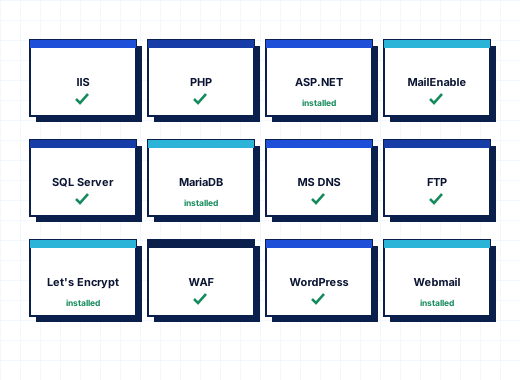
StackRegent treats each piece as a component. The installer sets up a default set, and everything else is added, updated or removed later from Tools & Settings › Server Components. The list below is generated from the panel's own component catalog, so it always matches the current release.
Windows server hosting components installed by default#
A fresh install puts IIS and the panel on the server together with the components most hosting servers need: IIS URL Rewrite, Microsoft DNS Server, the Microsoft FTP Service, Web Deploy, PHP, MailEnable Standard, Roundcube, MariaDB and phpMyAdmin. You can choose a different set with the installer's -Components parameter; the install guide lists the options.
Some parts come with Windows itself. The .NET Framework 4.x and ASP.NET 4.8 are part of Windows Server, and the installer enables ASP.NET 4.8. IIS is installed and repaired by the installer rather than from the components page.
Several versions side by side#
PHP, the ASP.NET Core Hosting Bundle and Node.js can be installed in several versions at once. Each website picks its own version, and for PHP and Node.js the components page shows how many websites use each one, so you can see when an old branch is safe to remove. PHP versions you keep for a few legacy sites can be hidden from new website settings without removing them.
PHP builds are the non-thread-safe x64 builds from windows.php.net, run through FastCGI as each website's own Windows user with a php.ini built from the server-wide file of that version plus the site's own settings. Node.js LTS versions come from nodejs.org and run behind IIS through iisnode, inside the website's application pool.
How downloads are verified#
Every component download is checked before it runs:
- PHP, Node.js, MariaDB, Roundcube and ModSecurity archives are compared with the SHA-256 checksums their projects publish. When no checksum is published for a Roundcube version, the panel refuses to install it.
- Microsoft installers, such as SQL Server Express and Web Deploy, must carry a valid Authenticode signature from Microsoft.
- .NET bundles are compared with the SHA-512 checksums in Microsoft's release metadata.
- Other signed installers, such as MailEnable, Git for Windows and the SpamAssassin build, must carry their publisher's signature.
The panel itself is updated the same careful way: releases come only from the license server and are checked for size, SHA-256 and the StackRegent release signature before they install.
Dependencies and removal#
Components know what they need. PHP needs the Visual C++ runtime; iisnode needs URL Rewrite; Composer, WP-CLI, phpMyAdmin and Roundcube need PHP. The page installs requirements in the right order.
Removing a component stops the websites that rely on it until it is installed again, so the page asks for confirmation first. Components managed by Windows or the installer cannot be removed from the panel.
Databases and mail as components#
MariaDB Server holds the databases of hosted websites on port 3306, separate from the MariaDB instance the panel uses for its own data on port 8306. Microsoft SQL Server Express installs as instance SQLEXPRESS on port 1433; its databases are limited to 10 GB each by Microsoft, and a Standard edition you own can be registered as a database server instead. phpMyAdmin opens MariaDB databases from the panel with single sign-on on port 9445. Installing MariaDB or SQL Server also adds Microsoft Defender exclusions for their data folders, because scanning open database files slows queries and can damage them.
MailEnable Standard provides SMTP, POP3, IMAP, mailing lists and DKIM signing, with mailboxes managed in the panel. Roundcube serves webmail on webmail.<domain>. SpamAssassin runs as a local service on 127.0.0.1 only and scores incoming mail for the spam filter, with daily rule updates.
Security and developer tools#
ModSecurity for IIS with the OWASP Core Rule Set 4 is the web application firewall. It starts in detection-only mode so you can switch off rules that hit legitimate traffic before blocking. Git for Windows, Composer and WP-CLI power the Git page of websites, the PHP Composer page and Laravel Toolkit, and the WordPress Toolkit.
Why components matter when you compare panels#
A panel that installs its own stack can test that stack with every release, keep versions consistent across your servers and fix them with Diagnose & Repair when something drifts. A panel that only manages software you installed yourself leaves those jobs to you. That is one of the main differences on the comparison page. To see the components page on your own server, start the free trial; see PHP and ASP.NET for how websites use them.
Frequently asked questions
Which components does StackRegent install by default?
IIS with URL Rewrite, Microsoft DNS Server, the Microsoft FTP Service, Web Deploy, PHP, MailEnable Standard, Roundcube, MariaDB and phpMyAdmin. Others, such as SQL Server Express, Node.js and ModSecurity, are installed later from Server Components.
Can I run several PHP or Node.js versions on one server?
Yes. PHP, the ASP.NET Core Hosting Bundle and Node.js can be installed in several versions side by side, and each website chooses its own.
How does StackRegent make sure a download is genuine?
Archives are compared with the SHA-256 or SHA-512 checksums their publishers release, and installers must carry a valid publisher signature, such as Microsoft's Authenticode signature. A download that fails the check is not installed.
Can I use my own SQL Server Standard edition?
Yes. SQL Server Express is the component the panel installs, but a Standard edition you own can be registered under Database Servers instead.
What happens if I remove a component that websites use?
The websites that rely on it stop working until it is installed again, so the panel asks you to confirm. Components managed by Windows or the installer cannot be removed.